

Reviews
Personal Wardrobe Designer Simulator succeeds by removing all competitive elements from the dress-up genre. The interface is intuitive, allowing quick outfit changes and makeup trials. Background choices add context to each look, and the screenshot feature enables easy sharing. The broad platform support means you can design on any device. While it lacks advanced features like pattern mixing or fabric textures, its simplicity is a strength for casual players seeking a creative outlet. The game respects your time and encourages experimentation without judgment.
Description
Creative Outfit Assembly
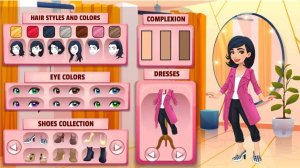
This game centers on selecting and combining garments, shoes, and accessories to build complete looks. Players start with a base model and can adjust fundamental features before moving to wardrobe choices. The interface presents categories of items, making it straightforward to browse through tops, bottoms, dresses, and footwear. Each piece can be swapped independently, encouraging experimentation with different color palettes and silhouettes. The process feels more like browsing a personal closet than following strict fashion rules, which keeps the activity light and enjoyable.
Makeup and Detail Customization
Beyond clothing, the game offers options for facial enhancement through virtual makeup application. Players can choose eyeshadow shades, lip colors, and blush tones to complement their outfit selections. These cosmetic choices allow for finer control over the overall aesthetic, from natural daytime looks to bolder evening styles. The makeup tools are simplified for quick application, so users can see results immediately without complex layering. This layer of customization adds depth without overwhelming the player.
Background Selection and Scene Setting
Once an outfit and makeup are finalized, players can place their character in different environments. Available backdrops include indoor spaces like bedrooms and outdoor locations such as parks. The background choice frames the final presentation, giving context to the outfit. A casual look might suit a park setting, while a more polished ensemble could fit a mall scene. This feature helps players think about how clothing works in real-world settings, adding a subtle layer of practical styling education.
Cross-Platform Accessibility
The game runs on web browsers, Android devices, and iOS systems, meaning players can access their styling projects from multiple devices. Progress is not tied to a single platform, though specific save features may vary. The controls are designed for touch screens and mouse input equally, ensuring a consistent experience whether on a phone, tablet, or computer. This broad compatibility makes it easy to pick up where you left off or start a new design on any available device.
Sharing and Social Features
A built-in screenshot function allows players to capture their finished designs and share them with friends or on social media. This turns individual creativity into a social activity, as others can view and comment on the looks. While the game itself does not include a competitive element, sharing creations can inspire new ideas and combinations. The emphasis remains on personal expression rather than comparison, maintaining the relaxed atmosphere throughout the experience.
Compatibility
Faq
Recommended Games
Kids Royal Creative Playtime

Find the Digits Paint by Number

Bamboo Haven: Panda Care

Celebration Costume Creator
Pixel Art Room Fill
Wholesome Outfit Designer for All Ages
Personal Wardrobe Designer Simulator
Player Comments
Sign in to comment
You must be logged in before posting a review or rating.
No account? Create one
No comments yet. Be the first to comment!